It's been a busy week!
Theresa delivered another Yoda "lip sync" test clip:
Pretty good, huh?
Jay's ADR + Theresa's CG = CG Yoda
Yoda still has a long way to go, but he looks more and more realistic with each iteration. Theresa's spent a lot of time animating Yoda and her hard work is paying off. Very impressive...
Don't ask me why, but I decided to re-texture map the Venator-class Star Destroyer... AGAIN! Here are before-and-after shots from our "Star Tours" shot, along with a reference photo from "Revenge of the Sith":


The original Star Destroyer model is beautiful, but it was never designed for the extreme close-ups that we're using. Since our model needs to hold-up to closer scrutiny than originally intended, I completely switched some of the texture maps. If you compare the "after" picture (2nd pic) to the "Revenge of the Sith" reference picture (3rd pic), you can see that the new texture maps are much more accurate.
Here's another before-and-after comparison:


I still need to fix the texture maps on the side of that reddish sticky-outy thing, but I'll deal with it later...
Here's a before-and-after comparison from the scene when the Star Destroyer exits hyperspace over Dantooine:


Finally, here are some side-by-side comparisons with reference pictures from "Revenge of the Sith":


Especially in that 2nd pair of pictures, the lighting conditions are different, but it's close enough to check the texture maps.
We shot 2 days last week -- Stormtroopers and Imperial Officer! Sweet...
Here are before-and-after shots of Scene I524a. It's the scene in Bibble's Bar when Katinka shoots the Stormtroopers:


I LOVE the original shot, but unfortunately we didn't have a scorch mark on the Stormtrooper's armor. The original intent was to add a digital scorch mark, but it ended up being a huge pain to rotoscope and it still looked fake. :(
I racked my brain trying to figure out how to achieve scorch marks without permanently discoloring my Stormtrooper armor. We finally achieved the effect by taping black Cinefoil (cut into a "scorch mark" pattern) to the armor. It's such a simple solution that it's embarrassing that I didn't think of it sooner, but you'd be surprised how hard it was to figure out.
If you look at the Stormtrooper's chest in the 2nd picture, you can see the super-cool scorch mark. Here's a reference picture from "Star Wars" showing that blasters leave scorch marks on Stormtrooper armor:

They MUST have had rubber "stunt" Stormtrooper armor in "Star Wars," because I don't see how they could have done some of those stunts in plastic armor. I speak from painful experience. More about that later...
Anyway, here are before-and-after shots of the Stormtroopers escorting Brad in the Star Destroyer hangar:


Brad and the "Hover Gurney" Stormtrooper are still missing from this shot, and I still haven't figured out how to add realistic digital reflections in the floor, but it's still a huge improvement over the CG-only animatic (1st pic).
A few scenes later, Brad uses The Force to snatch one of the Stormtrooper's blasters:


Again, Brad and the "Hover Gurney" Stormtrooper are still missing from the revised shot. We'll add them later.
After snatching the blaster, Brad shoots the "Hover Gurney" Stormtrooper in the head:


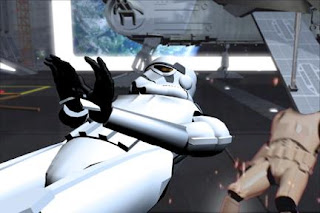
(Brad is represented by the CG Stormtrooper until we shoot his live footage.)
That fall looks pretty real, right? Unfortunately, that's because it WAS a real (and unplanned) fall:


Ouch! Remember when my tailbone WASN'T shattered into 18 pieces? You know, back before I started peeing blood? Ah, the good old days...
Anyway, my worst fear was almost realized Monday night. I always feared that I'd accidentally fall, crack the Stormtrooper armor, pierce my kidney (or spleen, or other organ) with a sharp piece of broken armor, and bleed-out on my mats. :(
GN, BN. The good news is that I didn't pierce any important organs. The bad news is that I still fell flat on my butt. It completely knocked the wind out of me and I was sore for a few days. But you know what they say: pain is temporary, film is forever.
Lesson Learned: ALWAYS practice stunts beforehand! In this particular case, the problem is that in all other "Stormtrooper getting shot" scenes, I'd backpedel a few steps and Brad would stop me from falling over. But in this particular "shot in the head" scene, I fell straight backwards like a sack of potatoes.
When we shot the earlier animatic of this scene, Sarah caught me -- Brad wasn't there that night. Since he'd seen the animatic, I assumed he knew I'd be falling straight back. Well, never "assume," especially when your spleen is at risk. Just trust me on that one...
On the plus side, not only did we get a real fall for that scene (YES, we're keeping it, and NO, I'm not re-shooting it!), but we also got a good blooper. The actual fall isn't that funny because you hear me hit the ground pretty hard, so I had to mask the actual sound with a cartoon "falling" sound effect to make it funnier.
Perhaps even funnier is that I've literally "fallen and I can't get up!" (Now I know how old people feel.)
Since I can't bend my legs very well in the Stormtrooper armor, Brad had to lift me up. The problem is, I outweigh Brad
and I couldn't bend my knees, so I was dead-weight. As a result, Brad had to use his body weight and fall backwards in order to pull me to my feet:


It was only after we were both on our feet and recovering from our mutual falls that we realized the camera was still rolling...
Anyway, after Brad shoots the "Hover Gurney" Stormtrooper in the head, he shoots the retaining clamps holding a storage container that's suspended from the ceiling:


The 1st picture shows the sparks after he shoots the retaining clamp on the right.
The 2nd picture shows the 2nd laser blast hitting the retaining clamp on the left.


The 1st picture shows the storage container starting to fall. I also like that "molten metal" look on the scaffolding where the laser blast hit. That wasn't intentional -- it was a nice side effect from the stock footage we used for the falling sparks (available for free, along with a ton of other cool stock footage, at
Detonation Films).
The 2nd picture is a reference shot from "Revenge of the Sith" showing where I got the camera angle and sparks idea.
What?!? Imitation is the sincerest form of flattery, right? It's not like we're real filmmakers. We need all the help we can get!
Here's a shot that I wasn't sure we'd be able to get since we don't have a crane. It's a point-of-view shot as the storage container falls on the Stormtroopers:


The original plan was to replace all 4 CG Stormtroopers with live Stormtrooper footage. However, when I composited the shot, I realized that as the camera approaches the Stormtroopers, the perspective changes on the 3 Stormtroopers that aren't directly under the camera. In other words, at the beginning of the shot, you can only see the top of their heads. But as the camera falls towards them, you can see more of their bodies as the camera's perspective changes. Since the live Stormtrooper footage didn't have a corresponding perspective change, it looked totally fake. :(
Since we don't have motion control equipment, our only choice is to use live footage for the "main" Stormtrooper (i.e. the one who looks up a moment before being crushed by the storage container), and use CG Stormtroopers for the other 3 so that their perspective changes realistically.
Fortunately, this workaround also made my life easier when motion-tracking the live Stormtrooper footage into the shot, because I had 3 CG Stormtrooper size references that allowed me to accurately scale our live Stormtrooper to match the camera's rate of descent.
I know... I know... the live Stormtrooper looks different from the 3 CG Stormtroopers. We'll fix that later. This is still just an animatic, so I didn't want to burn a lot of time on it.
Here are behind-the-scenes pictures of how we achieved that shot without a crane -- guerrilla filmmaking at its finest!


Fortunately, Brad held the camera rock-steady, which made post-production
much easier! The last thing I need is a jittery shot that I have to motion-stabilize.
Here are before-and-after shots of the next scene, which shows the storage container actually crushing the Stormtroopers:


The revised shot still lacks digital reflections, Brad, and the dead "Hover Gurney" Stormtrooper. We'll add those details later.
Here are 2 more screenshots from that scene:


CRUNCH!
The arrow in the 2nd picture shows Brad's (digital) lightsaber rolling on the floor. It falls free from one of the Stormtrooper's belts when he gets crushed. This is important, because in a subsequent scene, Brad uses The Force to retrieve his lightsaber, which he then uses to fight Darth Vader. I almost forgot to add the lightsaber to this shot, so we would have had a continuity "goof" for the astute viewer.
That wraps up the Stormtrooper footage we shot on Tue. On Thu., Sarah's dad came over to shoot Imperial Officer footage.
Here's a behind-the-scenes picture of Sarah looking on as her dad gets "in character" and practices his lines:

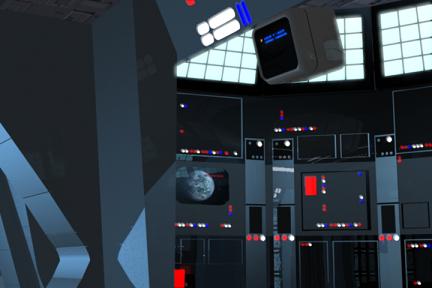
And here are before-and-after pictures of his scenes. The 1st one is in the Jedi Temple's central security station as he addresses a Clone Trooper:


His eye line was off (my fault), so that's why I had to move him up-and-right a bit. Also, since the digital set isn't final yet, I didn't bother to add any color correction -- that's why he looks too bright.
Here's a hologram of Imperial Officer on the Star Destroyer bridge, reporting to Darth Vader:


This was a tough scene for Mr. Stevens because it was a lot of dialogue involving lots of unfamiliar words ("holodisc," "databank," etc.). Some of his more interesting (and funny) takes involved a "homecoming beacon" (instead of a "homing beacon") and "clown troopers" (instead of "Clone Troopers"). :D
To make things even worse, about halfway through the night, Brad noticed that Mr. Stevens wasn't wearing his belt! Yes, in case you were wondering, it's
completely, 100% Sarah's fault. :D
Fortunately, the other shots were too close to show his missing belt. Unfortunately, this shot (above) had to be re-done and it was his most difficult scene. So not only did he do a great job on the 1st 4 takes, but he had to re-memorize his lines and deliver another 4 takes after a long night of shooting. We're grateful to him for being such a good sport.
I' m especially grateful that Mr. Stevens delivered a great performance in the re-shoots because otherwise I would have had to digitally-add his belt to the original (beltless) footage. (I figured I could get away with a composited belt since it's a hologram and thus the seam would be harder to spot.) Fortunately, he gave strong performances in the re-shoots, so the compositing was unnecessary (phew!).
Here's an example of Mr. Stevens' great acting as he's being choked by Darth Vader:


And he also did a great job collapsing to the floor, suffocated to death:

We've shot a ton of live footage recently, and the master animatic is coming along nicely. It's amazing how much progress we've made over the past 2 months.
Jen is coming over Mon. to shoot some live footage. She's going to be the female arcade game character in the Bibble's Bar scene. I don't expect her footage to take very long, so I'm also hoping to shoot Darth Vader footage Monday night.
Later,
Bob