First of all, thanks for the comments on the previous post. It's funny how shots that were state-of-the art for us a year or two ago now look totally amateur. It will be interesting to see what our final footage looks like. I can't wait!
Brad and I built new Jedi comlink and Merr-Sonn bomb props. Here are before-and-after pictures:


The 1st picture shows the original Jedi comlink (a store-bought "Star Wars: Episode 1" walkie talkie) and the original time bomb prop (which I clunked together, mostly from a battery charger).
The 2nd picture shows the re-painted Jedi comlink (which more accurately matches the Jedi comlinks in "Star Wars") and a completely new time bomb prop (we'll probably add a countdown display on that translucent screen in post-production).
Even though we only re-painted the Jedi comlink prop, it looks much more accurate:


There are slight differences between our repainted Jedi comlink prop and the real props used in "Star Wars," but I think ours look good enough. Also, in case you were wondering, we went with gray instead of silver because silver creates too much green spill, which means we can't chromakey the footage.
On the CG side, I had to go back and retrofit a bunch of our CG-only scenes to match our new live footage scenes (i.e. Brad in the Jedi Starfighter cockpit). Here are a bunch of before-and-after comparisons:
Scene B100 (Brad flying over the Coruscant cityscape on the way to the Jedi Temple):


If you remember, that's a whip-pan shot where the camera moves quickly from left-to-right as it follows the Jedi Starfighter. The new scene looks so beautiful that I had to include another shot from the end of that scene:

I added an arrow so that you can see the Jedi Starfighter as it banks to the left. What a gorgeous shot! :D
Here's Scene B102a (the Jedi Starfighter landing at the Coruscant spaceport):


Hmmm... I just realized that 2 of our new-and-improved shots (Brad in the Jedi Starfighter cockpit, and the Jedi Starfighter landing at the Coruscant spaceport) are in our blog header graphic (above). Pretty funny that we've already improved those shots...
Anyway, here's Scene B102b (close-up of the Jedi Starfighter landing at the Coruscant spaceport):


Yes, I removed the Outrider model from the new shot. (You can see its blue engine and fuselage in the "before" shot -- it looks kind of like a runt Millennium Falcon, and it's facing 2 o'clock in the "before" picture if you're having trouble spotting it). I decided the Outrider just added visual clutter and unnecessary size to our 3ds file, so I deleted it. I don't think the scene is lacking from its absence...
Here's Scene C118 (Brad climbing into the Jedi Starfighter cockpit as he escapes from the pursuing Clone Troopers):


Like the previous shot (Scene B102b, above), I removed an unecessary spaceship (in this case, the blue/silver concept Jedi Starfighter model) for the same reasons as above.
Scene C119b (Clone Troopers shooting at the Jedi Starfighter as it lifts off from the Coruscant Spaceport):


Scene B121 (close-up of the homing beacon getting shot onto the Jedi Starfighter's fuselage):


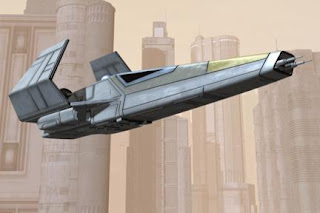
And finally, Scene B122 (the Jedi Starfighter streaking away as Brad escapes from Coruscant):

Looking at all of the new-and-improved scenes, you may have noticed continuity issues between them -- mostly with color-correction, but also with traffic streams and other details. I know... I know... I'll fix those later...
In fact, I think some of those shots are too dark, so I'll probably brighten them too... later.
We're shooting more live footage of Brad tomorrow, so we should have more super-cool pictures in the next blog post. We almost had to cancel because I ordered Jedi belt pouches for Brad's costume, but they didn't arrive until this afternoon. Talk about last minute!
Later,
Bob


